Tag Archives: cURL and libcurl

curl bug-bounty stats

tldr: the curl bug-bounty has been an astounding success so far.

We started the current curl bug-bounty setup in April 2019. We have thus run it for five and a half years give or take.

In the beginning we awarded researchers just a few hundred USD per issue because we did not know where it would go and as we used money from the curl fund (donated money) we wanted to make sure we could afford it.

Since a few years back, the money part of the bug-bounty is sponsored by the Internet Bug Bounty, meaning that the curl project actually earns money for every flaw as we get 20% of the IBB money for each bounty paid.

While the exact award amounts per report vary over time, they are roughly 500 USD for a low severity issue, 2,500 USD for a Medium and almost 5,000 USD for a High severity one.

To this day, we have paid out 84,260 USD to security researchers as rewards for their findings, distributed over 69 separate CVEs. 1,220 USD on average.

Counters

In this period we have received 477 reports, which is about 6 per month on average.

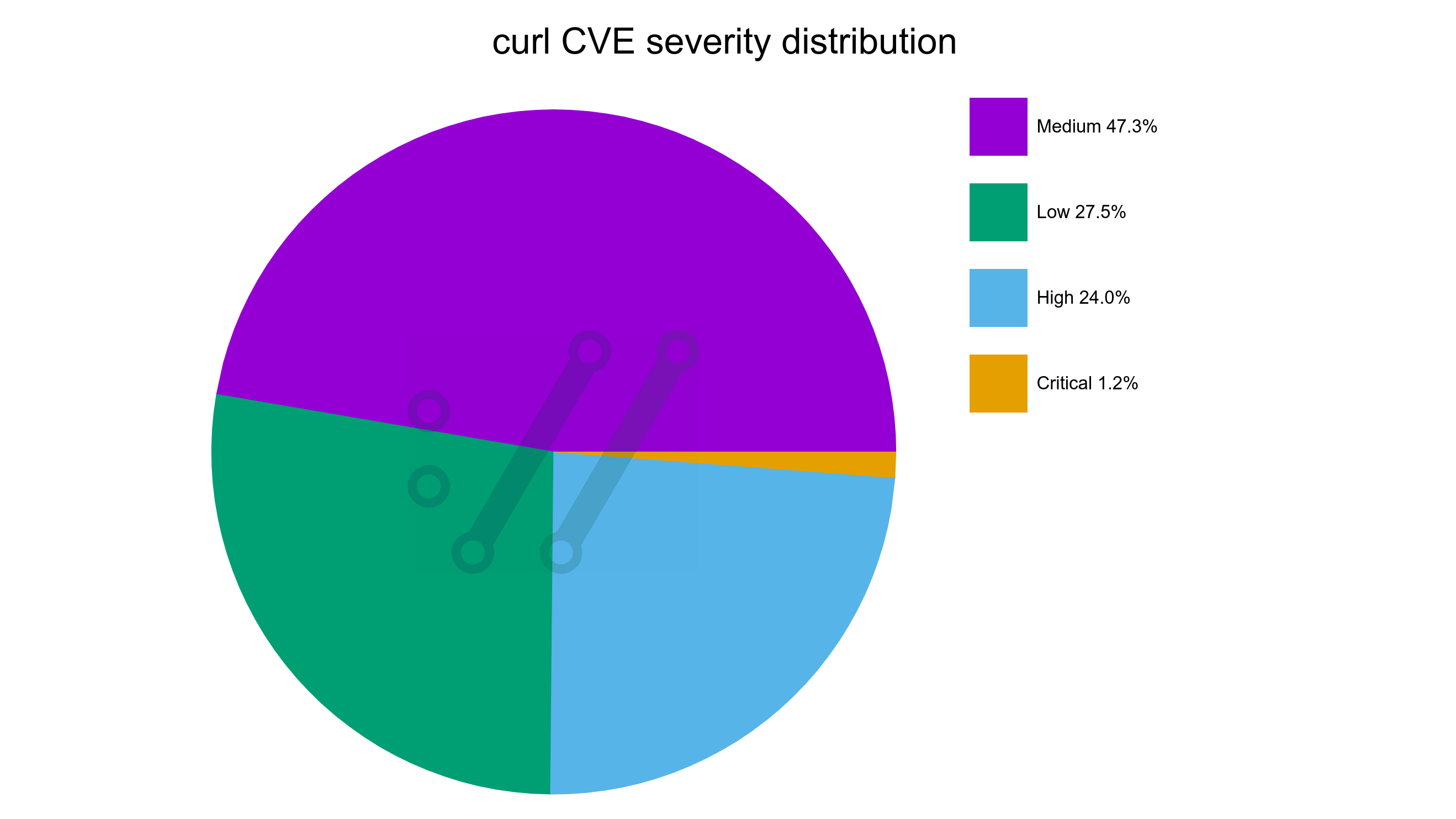
73 of the reports (15.4%) were confirmed and treated as valid security vulnerabilities that ended up CVEs. This also means that we get roughly one valid security report per month on average. Only 3 of these security problems were rated severity High, the rest were Low or Medium. None of them reached the worst level: Critical.

92 of of the reports (19.4%) were confirmed legitimate bugs but not security problems.

311 of the reports (65.3%) were Not Applicable. They were not bugs and not security problems. See below for more on this category.

1 of the reports is still being assessed as I write this.

Tightening the screws

Security is top priority for us but we also continue to develop curl at a high pace. We merge code into the repository at a frequency of more than four bugfixes per day on average over the last couple of years. When we tighten the screws in this project in order to avoid future problems and to mitigate the risks that we add new ones, we need to do it using policies and concepts that still allow us to move fast and be agile.

First response

We have an ambition to always have a first response posted within 24 hours. Over these first 477 reports, we have had a medium response time on under one hour and we have never missed our 24 hour goal. I am personally a little amazed by this feat.

Time to triage

The medium time from filed report until the curl security team has determined and concluded with some confidence that the problem is a security problem is 36 hours.

Assessing

Assessing a (good) report is hard and usually involves a lot of work: reading up on protocols details, reading code, trying different reproducer builds/scripts and bouncing back and forth with the reporters and the security team.

Acknowledging that it is a security problem is only one step. The adjacent one that is at least equally difficult is to then figuring out the severity. How serious is this flaw? A normal pattern is of course that the researcher considers the problem to be several degrees worse than the curl security team does so it can take a great deal of reasoning to reach an agreement. Sometimes we even decree a certain severity against the will of the researcher.

The team

There is a curl security team that works on and with security reports. The awesome people in this group are:

Max Dymond, Dan Fandrich, Daniel Gustafsson, James Fuller, Viktor Szakats, Stefan Eissing and myself.

They are all long-time curl maintainers. Knowledgeable, skilled, trusted.

Report quality

65.3% of the incoming reports are deemed not even a bug.

These reports can be all sorts of different things of course. When promising people money for their reports, there is no surprise that we get a fair share of luck-seekers trying to earn a few bucks the easy route.

Some reporters run scanners against the code, the mail server or the curl website and insist some findings are bounty worthy. The curl bug-bounty does not cover infrastructure, only the products, so they are not covered no matter what.

A surprisingly large amount of the bad reports are on various kinds of “information exposure” on the website – which is often ironic since the entire website already is available in a public git repository and the information exposed is hardly secret.

Reporting scanner results on code without applying your own thinking and confirming that the findings are indeed correct – and actual security problems – is rarely a good idea. That also goes for when asking AIs for finding problems.

Dismissing

Typically, the worse the report is, the quicker it is to dismiss. That is also why having this large share of rubbish is usually not a problem: we normally get rid of them with just a few minutes work spent.

The better crap we get, the worse the problem gets. An AI or a person that writes a long and good-looking report arguing for their sake can take a long time to analyze, asses and eventually debunk.

Since security problems are top priority in the project, getting too much good crap can to some degree cause a denial of service in the project as we need to halt other activities while we take care of the incoming reports.

We run our bug-bounty program on Hackerone, which has a reputation system for reporters. When we close reports as N/A, they get a reputation cut. This works as a mild deterrence for submitting low quality reports. Of course it also sometimes gives the reporter a reason to argue with us and insist we should rather close it as informative which does not come with a reputation penalty.

The good findings

I would claim that it is pretty hard to find a security problem in curl these days, but since we still average in maybe twelve per year recently they certainly still exist.

The valid reports today tend to happen because either a user accidentally did something that made them look, research and unveil something troublesome, or in the more common case: they have put in some real effort into research.

In the latter cases, we see researchers run their own custom fuzzers on parts of the code that our own fuzzers have not exercised as well, we see them check for code patterns that have led to problems before or in other projects and we also see researchers get inspiration by previous reports and fixes to see if perhaps there were gaps left.

The best curl security problem finders today understand the underlying involved protocols, the curl architecture, the source code and they look for inconsistencies between them all, as such might cause security problems.

Bounty hunters

The 69 bug bounty payouts so far have been done to 27 separate individuals. Five reporters have been rewarded for more than two issues each. The true curl security researcher heroes:

ReportsNameRewarded
25Harry Sintonen29,620 USD
8Hiroki Kurosawa9,800 USD
4Axel Chong7,680 USD
4Patrick Monnerat7,300 USD
3z2_4,080 USD
Top-5 curl bounty hunters

We are extremely fortunate to have this skilled set of people tracking down and highlighting our worst mistakes.

Harry of course sticks out in the top with his 25 rewarded curl security reports. More than three times the amount the number two has.

(Before you think the math is wrong: a few reports have been filed that ended up as valid CVEs but for which the reporters have declined getting a monetary reward.)

My advice

I think the curl bug-bounty is an absolute and undisputed success. I believe it is a key part in our mission to keep our users safe and secure.

If you consider kicking off a bug-bounty for your project here’s my little checklist:

  • Do your software engineering proper. Run all the tools, tests, checks, analyzers, scanners, fuzzers you can and make sure they are at zero reported defects. To avoid a raging herd of reports when you open the gates.
  • Start out with conservative bounty amounts to get a lay of the land, then raise them as you go.
  • Own all security problems for your project. Whoever reports them and however they appear, you assess, evaluate, research and fix them. You write and publish the complete and original security advisory.
  • Make sure you have a team. Even the best maintainers need sleep and occasional vacation days. Security is hard and having good people around to bounce problems with is priceless.
  • Close/reject crap reports as quickly as possible to prevent them from wasting team time and energy.
  • Always fix security problems with haste. Never let them linger around.
  • Transparency. Make as much as possible open and public once the CVEs are out, so that your processes, communications, methods are visible. This builds trust and allows for feedback and iterative improvements of the process.

Future

I think we will continue to receive valid security reports going forward, simply because we keep developing at a high pace and we change and add a lot of source code every year.

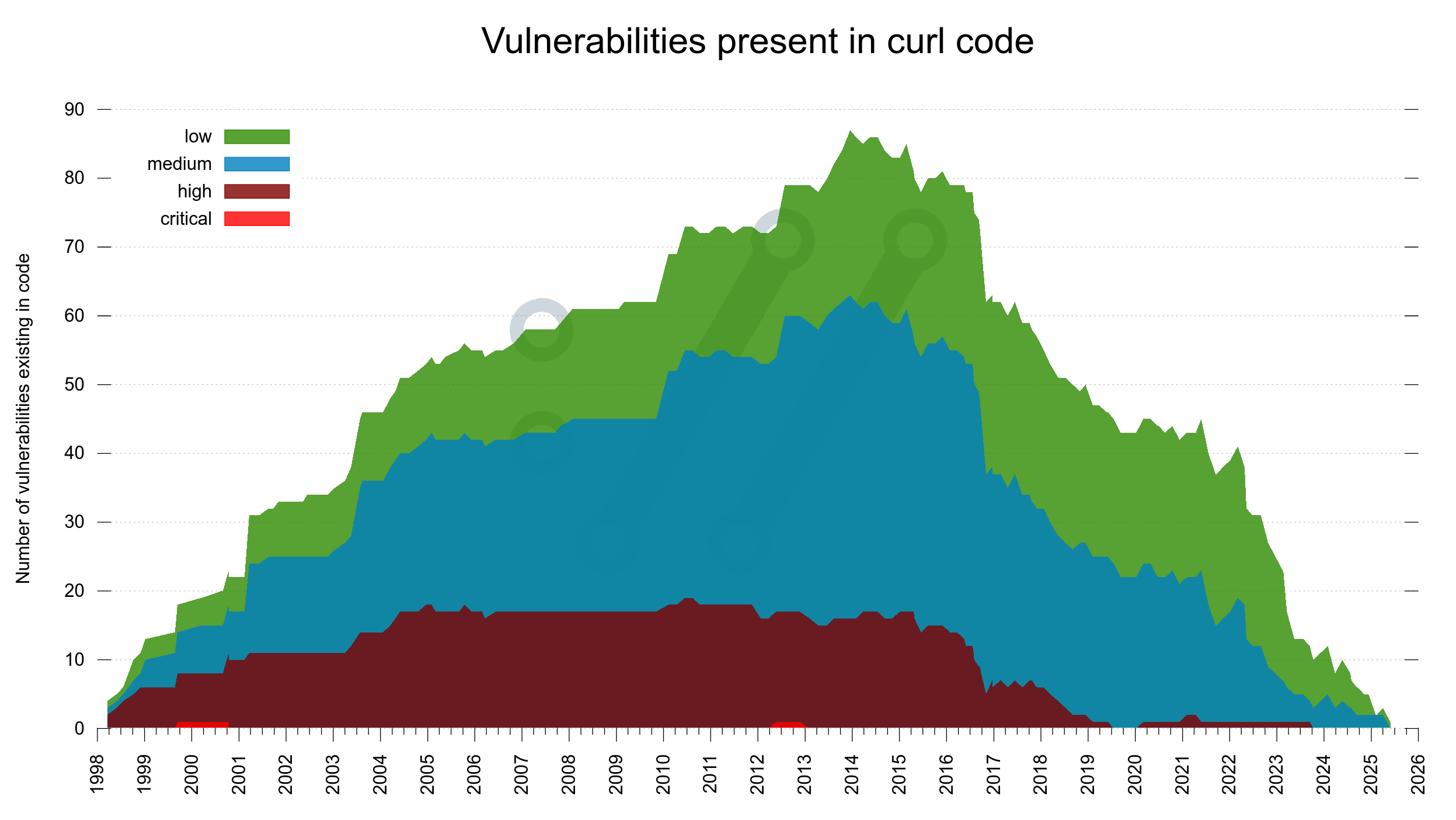
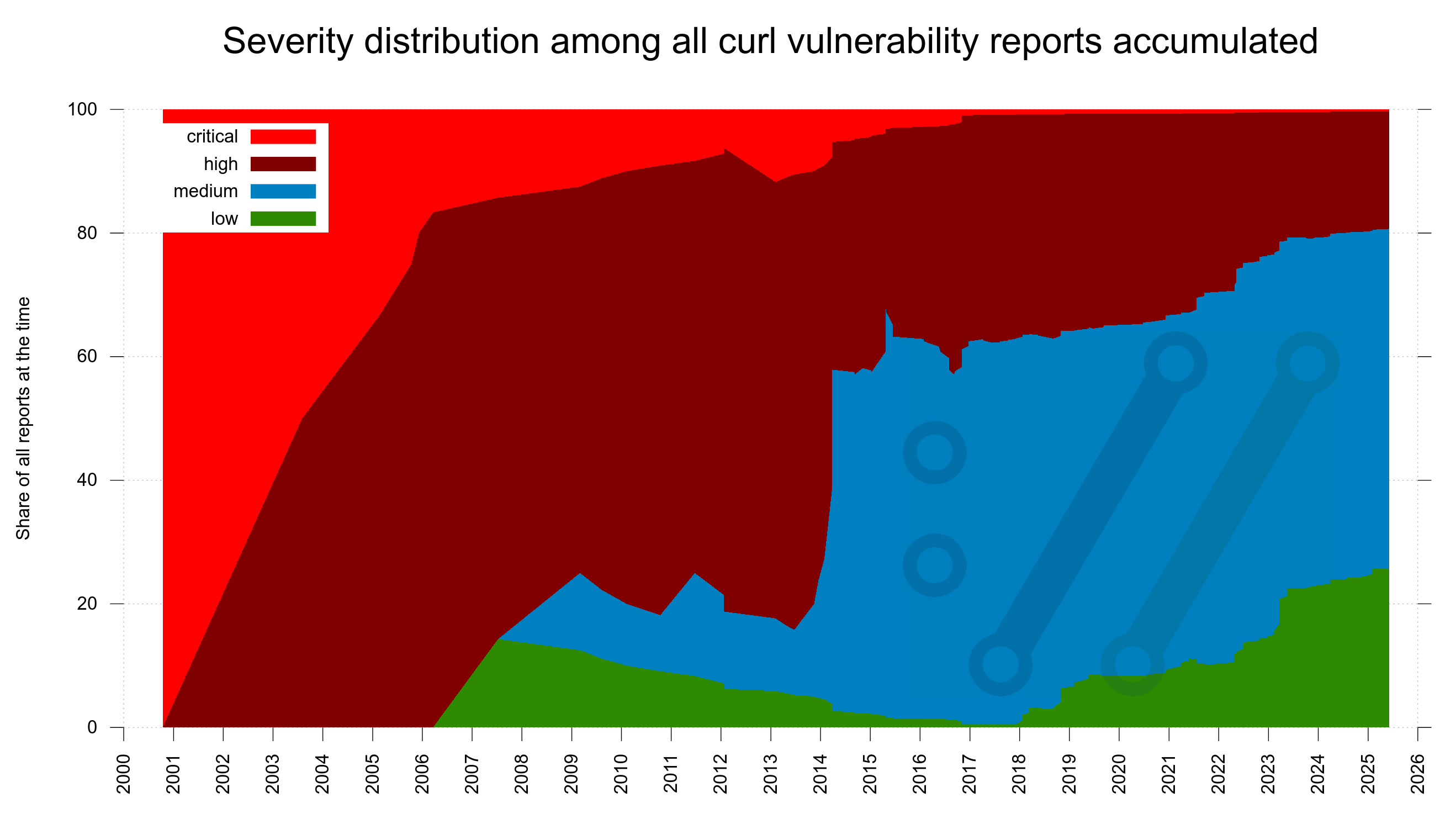
The trend in recent years have been more security reports, but the ratio of low/medium vs high/critical has sky-rocketed. The issues reported these days tend to be less sever than they were in the past.

My explanation for this is primarily that we have more people looking harder for problems now than in the past. Due to mitigations and past reports we introduce really bad security problems at a lower frequency than before.

Talk: Keeping the world from Burning

On Monday this week, I did a talk at the Nordic Software Security Summit conference in Stockholm Sweden. I titled it CVEMITRECVSSNVDCNAOSS WTF with the subtitle “Keeping the world from Burning”.

The talk was well received and I think it added something to the conversation. Almost every other talk during the rest of the conference that I saw referred back to it.

Since the talk was not recorded (no talks were at this event), I intend to do the presentation again – from home. This time live-streamed and recorded.

This happens on:

Monday September 30, 2024
14:00 UTC (16:00 CEST)

The stream happens on Twitch where I as always am curlhacker. Join the chatroom, ask questions, have a good time. There will of course be room for a Q&A.

No registration. No fee. Just show up.

At the conference, I did the presentation in under thirty minutes. This version might go on a few more minutes.

Abstract

The abstract I provided for this talk to the conference says:

Bogus CVEs, know-better organizations, conflicting databases, AI hallucinations, inflated severity scoring, security scanners, Jia Tan. As the lead developer in the curl project, Daniel describes some of the challenges involved and what you need to do to stay on top of security when working in a high profile Open Source project running in some twenty billion instances. The talk will be involving many examples from real life.

Differences

Since this is a second run of a talk I already did and I have no script, it will not be identical. I will also try to polish some minor details that I felt could need some brush-ups.

Recording

curl 8.10.1

Welcome to this follow-up patch release, just a week after we shipped 8.10.0. A bunch of bugfixes.

Numbers

the 261th release
0 changes
7 days (total: 9,679)

24 bugfixes (total: 10,828)
50 commits (total: 33,259)
0 new public libcurl function (total: 94)
0 new curl_easy_setopt() option (total: 306)

0 new curl command line option (total: 265)
19 contributors, 7 new (total: 3,246)
9 authors, 1 new (total: 1,303)
0 security fixes (total: 158)

Download the new curl release from curl.se as always.

Release presentation

Bugfixes

These are the perhaps most important ones fixed this time:

  • fix configure –with-ca-embed. It could otherwise sometimes lead to an empty bundled CA store.
  • cmake: ensure CURL_USE_OPENSSL/USE_OPENSSL_QUIC are set in sync
  • cmake: fix MSH3 to appear on the feature list
  • runtests: accecpt ‘quictls’ as OpenSSL compatible. It would previously skip a few tests that are marked OpenSSL specific.
  • connect: store connection info when really done
  • fix FTP CRLF line endings for ASCII transfer regression. Perhaps most notably this problem was seen on directory listings, which are done using ASCII mode.
  • fix HTTP/2 end-of-stream handling when uploading data from stdin
  • http: make max-filesize check not count ignored bodies. Like in the case where a URL is redirected to a second place, the first URL might still provide a body that curl ignores.
  • fix AF_INET6 use outside of USE_IPV6. Made the build fail on systems without IPv6 support.
  • check that the multi handle is valid in curl_multi_assign. Perhaps not exactly libcurl’s responsibility, but we found at least one application that did this after the 8.10.0 upgrade.
  • on QUIC connects, keep on trying on draining server
  • request: correctly reset the eos_sent flag. When doing multiple HTTP/2 uploads using the same handle – this caused problems for git.
  • transfer: fix sendrecv() without interim poll. An optimization that optimized a little too much… Most commonly this problem was seen with PHP programs that often (but unwisely) skip the polling.
  • rustls: fixed minor logic bug in default cipher selection
  • rustls: support strong CSRNG data. Now every curl build using TLS ensures use of strong random numbers.

curl 8.10.0

Numbers

the 260th release
18 changes
42 days (total: 9,672)

245 bugfixes (total: 10,804)
461 commits (total: 33,209)
0 new public libcurl function (total: 94)
0 new curl_easy_setopt() option (total: 306)

2 new curl command line option (total: 265)
57 contributors, 28 new (total: 3,239)
27 authors, 14 new (total: 1,302)
1 security fixes (total: 158)

Download the new curl release from curl.se as always.

Release presentation

Security

CVE-2024-8096: OCSP stapling bypass with GnuTLS When curl is told to use the Certificate Status Request TLS extension, often referred to as OCSP stapling, to verify that the server certificate is valid, it might fail to detect some OCSP problems and instead wrongly consider the response as fine.

Changes

  • –help [option]
  • –skip-existing
  • with -O, try harder to get a filename
  • make –rate accept number of units. Previously it accepted N requests per single time unit, now it supports N requests per Z time units.
  • make –show-headers the same as –include. To make the option name better spell out what it is for.
  • –dump-header supports % to direct to stderr. To match a few of the other options that already support this.
  • supports embedding a CA bundle and –dump-ca-embed. As this allows the curl tool to get built stand-alone without relying on an external CA store.
  • supports repeated use of the verbose option; -vv etc.
  • libuv for parallel transfers with –test-event. To allow better and easier testing of curl’s event-based API. Available in debug-builds only.
  • add CURLINFO_POSTTRANSFER_TIME_T
  • add –enable-windows-unicode configure option
  • CURLOPT_TLS13_CIPHERS for mbedTLS and wolfSSL
  • support for setting TLS version and ciphers for Rustls
  • stop offering ALPN http/1.1 for http2-prior-knowledge
  • support for sslcert/sslkey blob options for wolfSSL
  • release tarball 100% reproducible. We also provide verify-release a convenient shell script allowing anyone and everyone to easily verify curl release tarballs.

Bugfixes

See the full changelog for the complete list. Here follows my favorite subset:

  • build: add poll() detection for cross-builds
  • cmake: 40+ bugfixes
  • configure: fail if PSL is not disabled but not found
  • runtests: remove “has_textaware”
  • curl: find curlrc in XDG_CONFIG_HOME without leading dot
  • curl: make the progress bar detect terminal width changes
  • curl: bump maximum post data size in memory to 16GB
  • bearssl/mbedtls/rustls/wolfssl: fix setting tls version
  • gnutls/wolfssl: improve error message when certificate fails
  • gnutls: send all data
  • openssl: certinfo errors now fail correctly
  • sectransp: fix setting tls version
  • x509asn1: raise size limit for x509 certification information
  • ftp: always offer line end conversions
  • ftp: fix pollset for listening
  • http2: improved upload eos handling
  • idn: support non-UTF-8 input under AppleIDN
  • ngtcp2: use NGHTTP3 prefix instead of NGTCP2 for errors in h3 callbacks
  • pop3: fix multi-line responses
  • managen: fix superfluous leading blank line in quoted sections. Nicer HTML version of the manpages.
  • managen: in man output, remove the leading space from examples
  • managen: wordwrap long example lines in ASCII output. Nicer curl --manual and -h output.
  • manpage: ensure a maximum width for the text version.
  • connect: always prefer ipv6 in IP eyeballing
  • aws_sigv4: fix canon order for headers with same prefix
  • cf-socket: prevent KEEPALIVE_FACTOR being set to 1000 for Windows
  • rand: only provide weak random when needed
  • sigpipe: init the struct so that first apply ignores
  • url: fix connection reuse for HTTP/2 upgrades
  • urlapi: verify URL decoded hostname when set
  • asyn-thread: stop using GetAddrInfoExW on Windows

webinar: mastering the curl command line

Yes!

It is yet again time for a dual Zoom-twitch curl webinar. This one-hour (or so) session will be live-streamed on Twitch and broadcast on Zoom concurrently.

Of course entirely free to attend.

Date: September 5, 2024
Time: 17:00 UTC (19:00 CEST, 10:00 PDT)

The presentation will be followed by a Q&A session for all your curl questions.

You can select which one to view/attend. On the Zoom call, you will be able to ask questions via voice and on both you can ask questions via text/chat.

The Zoom version must be signed-up for to attend. The Twitch version you can just show up to.

Recording

The slides

a filename when none exists

This is episode four in my mini-series about shiny new features in the upcoming curl 8.10.0 release.

One of the most commonly used curl command line options is the dash capital O (-O) which also is known as dash dash remote-name (--remote-name) in its long form.

This option tells curl to create a local file using the name from the filename part of the provided URL when downloading. I.e. when you tell curl

curl -O https://example.com/file.html

This command line conveniently creates a local file called file.html in which it saves the downloaded data.

The -O option has been supported with this functionality since curl first shipped, in March 1998. An important point here is that it picks the name from the URL so that a user can tell what filename it creates. No surprises. The remote server is not involved in naming it.

What about no filename scenarios?

URLs do not necessarily need to have filename parts. Like these examples:

http://example.com/
http://example.com/path/
http://example.com/one/two/?id=12345

Since there are no filename parts in these URLs, they used to cause curl to refuse to operate with -O and instead return error. curl could not create a local filename to use:

$ curl -O http://example.com/
curl: Remote filename has no length
curl: (23) Failed writing received data to disk/application

Trying harder

Starting in curl 8.10.0, curl works a little harder to come up with a filename to store the download in when -O is used. While there is no filename part in the URL, the user did ask curl to download the URL to a local file so it now tries a few extra steps:

  1. Use the filename part from the URL if there is one, like before.
  2. If there is no filename but there is a path provided in the URL, extract the right-most directory name from the URL and use as filename.
  3. If there is neither a filename nor a path in the URL, curl uses a default, fixed, filename as a final backup: curl_response. This name intentionally has no extension because curl has no idea what data that will come and using an extension could mislead users into believing it says something about the type of content.

Several people have insisted that index.html would be better and sensible default file name. I cannot agree with that, since it might just as well be an image or a tarball of your favorite open source project. I think naming such a file index.html would be more misleading than simply sticking to the neutral curl_response.

Let me give you a little table showing what filenames that will be used with curl -O and a given set of URLs:

URLlocal filename
http://example.com/one.htmlone.html
http://example.com/one.html?clues=noone.html (curl ignores the query part)
http://example.com/one/two/?id=42two (because it is the right-most directory piece)
http://example.com/path/path (because it is the right-most directory piece)
http://example.com/curl_response (because no filename nor directory to use)

Find out which name

You can use curl’s -w, –write-out option and its %{filename_effective} variable to learn exactly which name that was used.

Prefer another name?

There is always the -o (lowercase o) option that lets you specify whatever filename you like. You do not have to let curl pick the filename for you.

Clobber or not

curl will by default overwrite, clobber if you will, any previously existing file using the same name. If you rather curl took a more careful approach, consider using –no-clobber in your command lines. It makes curl pick an alternative filename if the chosen one already exists when curl is about to download data into a local file.

skip a curl transfer

This is episode three in my mini-series of posts describing news in the coming curl 8.10.0 release. Part one was more help, part two verbose, verbose and verbosest.

This new command line option in curl 8.10.0 is a simple one that has been requested by users repeatedly over the years so I figure it was about time we actually provide it.

If the target file already exists on disk, skip downloading it.

It is exactly as simple as that. No date check, no size check, no checking if the file is even what you want it to be. If the target file is present and exists that is a signal enough that the file should not be downloaded; to skip the transfer.

A real-world command line using this feature could then look like this:

curl --skip-existing --output local/dir/file https://example.com

Or if instead -O is used, it still works the same:

curl --skip-existing -O https://example.com/me.jpg

Easy, right? See the manpage.

Broken files can also be present

To avoid a previous broken download remainder to linger around and cause future transfers to get skipped, remember that curl also has a –remove-on-errror option.

Ships

In curl 8.10.0, on September 11, 2024.

Image

From a movie with a suitable if even perhaps subtle reference.

So the Department of Energy emailed me

I received an email today. What follows is a slightly edited version (for brevity).

From: DOE Attestation <doe.attestation@hq.doe.gov>
Subject: [ACTION REQUIRED] U.S. Department of Energy Secure Software Development Attestation Submission Request

OMB Control No. 1670-0052
Expires: 03/31/2027

Hello Haxx

** The following communication contains important DOE Secure Software Development Attestation Submission instructions. Please read this communication in its entirety. **

The U.S. Department of Energy (DOE) has identified your company's software as affected by this request. The list of impacted software products and versions can be found below.

DOE Request:

In support of the Office of Management and Budget (OMB) requirement to collect attestations per M-22-18, please complete the U.S. Department of Energy Secure Software Development Attestation Form (DOE Common Form). If you are unable to attest to all secure software development framework (SSDF) practices, please be sure to attach your Plan of Action and Milestones (POA&M). The software listed below has been identified as being associated with your company and requires DOE to collect an attestation for the software.

Product Name Version Number

libcurl 8.3

The U.S. Department of Energy Secure Software Development Attestation Form (DOE Common Form) can be found at DOE F 205.2 Secure Software Development Attestation Form. The DOE Common Form identifies the minimum secure software development requirements a Software Producer must meet, and attest to meeting, before software subject to the requirements of M-22-18 as updated by M-23-16, may be used by Federal agencies. This form is used by Software Producers to attest that the software they produce is developed in conformity with specified secure software development practices and standards.

Regards,

DOE OCIO C-SCRM Team

Don’t you just love the personal touch in the signature in the end?

I could add that I have never been in contact with them before. I did not know they use libcurl before this email. I do not know what they use it for.

I find it amusing they insist this is “required” .

My response

I am not impossible and I will not deny them this information. So I pressed reply and immediately sent an answer back.

Hello Department of Energy,

I cannot find that you are an existing customer of ours, so we cannot fulfill this request.

libcurl is a product we work on. It is open source and licensed under an MIT-like license in which the distribution and use conditions are clearly stated.

If you contact support@wolfssl.com we can remedy this oversight and can then arrange for all the paperwork and attestations you need.

Thanks,

/ Daniel

Related

Other emails I have received. NASA emailed me.

Discussion

On hacker news.

slow TCP connect on Windows

I have this tradition of mentioning occasional network related quirks on Windows on my blog so here we go again.

This round started with a bug report that said

curl is slow to connect to localhost on Windows

It is also demonstrably true. The person runs a web service on a local IPv4 port (and nothing on the IPv6 port), and it takes over 200 milliseconds to connect to it. You would expect it to take no less than a number of microseconds, as it does on just about all other systems out there.

The command

curl http://localhost:4567

Connecting

Buckle up, this is getting worse. But first, let’s take a look at this exact use case and what happens.

The hostname localhost first resolves to ::1 and 127.0.0.1 by curl. curl actually resolves this name “hardcoded”, so it does this extremely fast. Hardcoded meaning that it does not actually use DNS or any resolver functionality. It provides this result “fixed” for this hostname.

When curl has both IPv6 and IPv4 addresses to connect to and the host supports both IP families, it will first start the IPv6 attempt(s) and only if it did not succeed to connect over IPv6 after two hundred millisecond does it start the IPv4 attempts. This way of connecting is called Happy Eyeballs and is the de-facto and recommended way to connect to servers in a dual-stack since years back.

On all systems except Windows, where the IPv6 TCP connect attempt sends a SYN to a TCP port where nothing is listening, it gets a RST back immediately and returns failure. ECONNREFUSED is the most likely outcome of that.

On all systems except Windows, curl then immediately switches over to the IPv4 connect attempt instead that in modern systems succeeds within a small fraction of a millisecond. The failed IPv6 attempt is not noticeable to a user.

A TCP reminder

This is how a working TCP connect can be visualized like:

But when the TCP port in the server has no listener it actually performs like this

Connect failures on Windows

On Windows however, the story is different.

When the TCP SYN is sent to the port where nothing is listening and an RST is sent back to tell the client so, the client TCP stack does not return an error immediately.

Instead it decides that maybe the problem is transient and it will magically fix itself in the near future. It then waits a little and then keeps sending new SYN packets to see if the problem perhaps has fixed itself – until a maximum retry value is reached (set in the registry, this value defaults to 3 extra times).

Done on localhost, this retry-SYN process can easily take a few seconds and when done over a network, it can take even more seconds.

Since this behavior makes the leading IPv6 attempt not possible to fail within 200 milliseconds even when nothing is listening on that port, connecting to any service that is IPv4-only but has an IPv6 address by default delays curl’s connect success by two hundred milliseconds. On Windows.

Of course this does not only hurt curl. This is likely to delay connect attempts for countless applications and services for Windows users.

Non-responding is different

I want to emphasize that there is a big difference when trying to connect to a host where the SYN packet is simply not answered. When the server is not responding. Because then it could be a case of the packet gotten lost on the way so then the TCP stack has to resend the SYN again a couple of times (after a delay) to see if it maybe works this time.

IPv4 and IPv6 alike

I want to stress that this is not an issue tied to IPv6 or IPv4. The TCP stack seems to treat connect attempts done over either exactly the same. The reason I even mention the IP versions is because how this behavior works counter to Happy Eyeballs in the case where nothing listens to the IPv6 port.

Is resending SYN after RST “right” ?

According to this exhaustive resource I found on explaining this Windows TCP behavior, this is not in violation of RFC 793. One of the early TCP specifications from 1981.

It is surprising to users because no one else does it like this. I have not found any other systems or TCP stacks that behave this way.

Fixing?

There is no way for curl to figure out that this happens under the hood so we cannot just adjust the code to error out early on Windows as it does everywhere else.

Workarounds

There is a registry key in Windows called TcpMaxConnectRetransmissions that apparently can be tweaked to change this behavior. Of course it changes this for all applications so it is probably not wise to do this without a lot of extra verification that nothing breaks.

The two hundred millisecond Happy Eyeballs delay that curl exhibits can be mitigated by forcibly setting –happy-eyballs-timeout-ms to zero.

If you know the service is not using IPv6, you can tell curl to connect using IPv4 only, which then avoids trying and wasting time on the IPv6 sinkhole: –ipv4.

Without changing the registry and trying to connect to any random server out there where nothing is listening to the requested port, there is no decent workaround. You just have to accept that where other systems can return failure within a few milliseconds, Windows can waste multiple seconds.

Windows version

This behavior has been verified quite recently on modern Windows versions.

verbose, verboser, verbosest

A key feature for a tool like curl is its ability to help the user diagnose command lines and operations that do not work the way the user intended them to.

When I do XYZ, why does it not work?

The command line option -v and its longer version --verbose have been supported by curl since day one for this purpose. A boolean flag that when used shows what is going on by outputting extra information from the execution.

I need to emphasize the boolean part here. Up until curl 8.10.0, this option was a plain boolean. You either did not get verbose output or you got it. There was no levels or ways to increase or decrease the amount of information shown. Just a binary one or zero. On or off.

But starting in 8.10.0 the story is different.

The world

Meanwhile, there is a universe of additional command line tools out there. Many other tools also offers a -v option for outputting verbose tracing information. In many other tools, the -v is not a boolean but instead you might get additional output if you add more vs. -vv shows a little more, -vvv even more etc.

Users are fairly trained on this. To the extent that we often get to see users use -vvv etc on curl command lines in bug reports etc. The curl command line parser accepts more of them fine (any amount really), but repeating them just enables the boolean again and again to no extra effect.

When we asked users for their favorite command line option in the annual curl user survey in May 2024, a noticeable amount of respondents said -vv or -vvv. Even though they do nothing extra than -v. I think this shows to which extent people are trained to and are used to having these options for command line tools.

Make curl do what you think it did

Therefore.

In curl 8.10.0, coming on September 11, 2024, we introduce support for -vv, -vvv and -vvvv. One, two, three or four vs. (Maybe we add more in the future.)

If you write the v-letters consecutive next to each other like that, you increase the logging level; the amount of verbose output curl shows. It might then possibly do something in the style that many users already expected it to do.

The extra logging it can do in 8.10.0 is actually nothing new, what is new is that you can get to it by simply using -vv and friends. The old style of getting such extra verbose tracing is to instead use a selected combination of –trace-time, –trace-ascii and –trace-config.

Backwards compatibility

In curl we care deeply about backwards compatibility and not breaking users existing scripts and use cases when we ship new versions. This change is perhaps on the border of possibly doing this, so we have tried to tread as gently as we can to make sure that risk is slim.

This is why doing something like curl -v -v will not increase the level, because a user might have one of the switches in ~/.curlrc, another one on the command line and a third one in a custom file read with curl’s -K option etc. We want the extra output level to be explicitly asked for.

Using a single -v after a -vv or -vvv resets the level back to the original lowest-but-enabled for the same reason. The --no-verbose option also still works, even though the option is not strictly a boolean anymore and curl normally otherwise only supports the --no- prefix for boolean command line options.

Credits

Stefan Eissing wrote the pull-request that landed this change.