Category Archives: Network

Internet. Networking.

trurl manipulates URLs

trurl is a tool in a similar spirit of tr but for URLs. Here, tr stands for translate or transpose.

trurl is a small command line tool that parses and manipulates URLs, designed to help shell script authors everywhere.

URLs are tricky to parse and there are numerous security problems in software because of this. trurl wants to help soften this problem by taking away the need for script and command line authors everywhere to re-invent the wheel over and over.

trurl uses libcurl’s URL parser and will thus parse and understand URLs exactly the same as curl the command line tool does – making it the perfect companion tool.

I created trurl on March 31, 2023.

Some command line examples

Given just a URL (even without scheme), it will parse it and output a normalized version:

$ trurl ex%61mple.com/
http://example.com/

The above command will guess on a http:// scheme when none was provided. The guess has basic heuristics, like for example FTP server host names often starts with ftp:

$ trurl ftp.ex%61mple.com/
ftp://ftp.example.com/

A user can output selected components of a provided URL. Like if you only want to extract the path or the query components from it.:

$ trurl https://curl.se/?search=foobar --get '{path}'
/

Or both (with extra text intermixed):

$ trurl https://curl.se/?search=foobar --get 'p: {path} q: {query}'
p: / q: search=foobar

A user can create a URL by providing the different components one by one and trurl outputs the URL:

$ trurl --set scheme=https --set host=fool.wrong
https://fool.wrong/

Reset a specific previously populated component by setting it to nothing. Like if you want to clear the user component:

$ trurl https://daniel@curl.se/ --set user=
https://curl.se/

trurl tells you the full new URL when the first URL is redirected to a second relative URL:

$ trurl https://curl.se/we/are/here.html --redirect "../next.html"
https://curl.se/we/next.html

trurl provides easy-to-use options for adding new segments to a URL’s path and query components. Not always easily done in shell scripts:

$ trurl https://curl.se/we/are --append path=index.html
https://curl.se/we/are/index.html
$ trurl https://curl.se?info=yes --append query=user=loggedin
https://curl.se/?info=yes&user=loggedin

trurl can work on a single URL or any amount of URLs passed on to it. The modifications and extractions are then performed on them all, one by one.

$ trurl https://curl.se localhost example.com 
https://curl.se/
http://localhost/
http://example.com/

trurl can read URLs to work on off a file or from stdin, and works on them in a streaming fashion suitable for filters etc.

$ cat many-urls.yxy | trurl --url-file -
...

More or different

trurl was born just a few days ago, this is what we have made it do so far. There is a high probability that it will change further going forward before it settles on exactly how things ideally should work.

It also means that we are extra open for and welcoming to feedback, ideas and pull-requests. With some luck, this could become a new everyday tool for all of us.

Tell us on GitHub!

QUIC and HTTP/3 with wolfSSL

Disclaimer: I work for wolfSSL but I don’t speak for wolfSSL. I state my own opinions and I try to be as honest and transparent as possible. As always.

QUIC API

Back in the summer of 2020 I blogged about QUIC support coming in wolfSSL. That work never actually took off, primarily I believe because the team kept busy with other projects and tasks that had more customer focus and interest and yeah, there was not really any noticeable customer demand for QUIC with wolfSSL.

Time passed.

On July 21 2022, Stefan Eissing submitted his work on introducing a QUIC API and after reviews and updates, it was merged into the wolfSSL master branch on August 9th.

The QUIC API is planned to appear “for real” in a coming wolfSSL release version. Until then, we can play with what is available in git.

Let me be clear here: the good people at wolfSSL has not decided to write a full QUIC implementation, because that would be insane when so many good alternatives are already being worked on. This is just a set of new functions to allow wolfSSL to be used as TLS component when a QUIC stack is created.

Having QUIC support in wolfSSL is just one (but important) step along the way as it makes it possible to use wolfSSL to build a QUIC implementation but there are some more steps needed to turn this baby into full HTTP/3.

ngtcp2

Luckily, ngtcp2 exists and it is an established QUIC implementation that was written to be TLS agnostic from the beginning. This “only” needs adaptions provided to make sure it can be built and used with wolSSL as the TLS provider.

Stefan brought wolfSSL support to ngtcp2 in this PR. Merged on August 13th.

nghttp3

nghttp3 is the HTTP/3 library that uses ngtcp2 for QUIC, so once ngtcp2 supports wolfSSL we can use nghttp3 to do HTTP/3.

curl

curl can (as one of the available options) get built to use nghttp3 for HTTP/3, and if we just make sure we use an underlying ngtcp2 built to use a wolfSSL version with QUIC support, we can now do proper curl HTTP/3 transfers powered by wolfSSL.

Stefan made it possible to build curl with the wolfSSL+ngtcp2 combo in this PR. Merged on August 15th.

Available HTTP/3 components

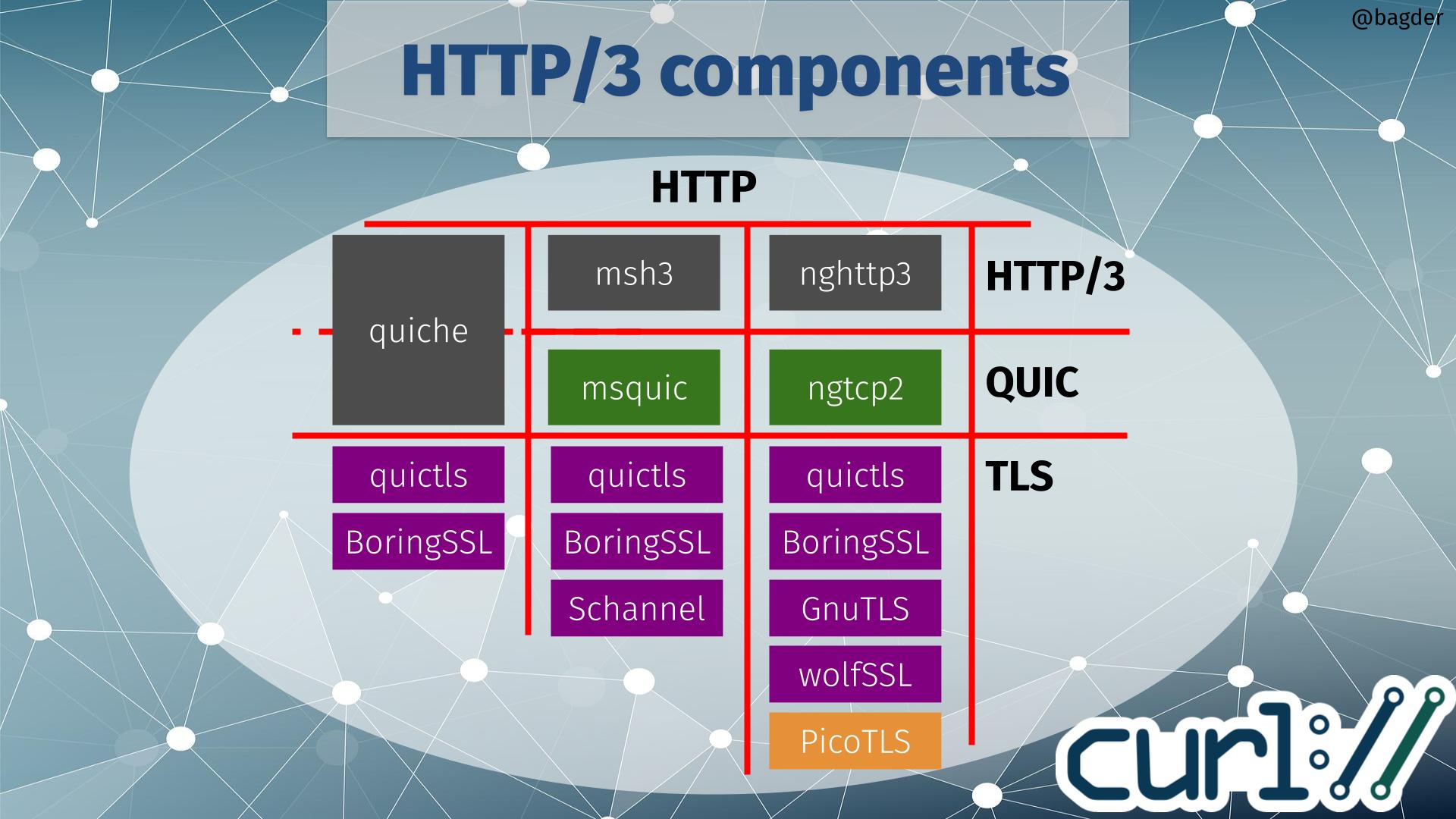
With this new ecosystem addition, the chart of HTTP/3 components for curl did not get any easier to parse!

If you start by selecting which HTTP/3 library (or maybe I should call it HTTP/3 vertical) to use when building, there are three available options to go with: quiche, msh3 or nghttp3. Depending on that choice, the QUIC library is given. quiche does QUIC as well, but the two other HTTP/3 libraries use dedicated QUIC libraries (msquic and ngtcp2 respectively).

Depending on which QUIC solution you use, there is a limited selection of TLS libraries to use. The image above shows TLS libraries that curl also supports for other protocols, meaning that if you pick one of those you can still use that curl build to for example do HTTPS for HTTP version 1 or 2.

TLS options

If you instead rather pick TLS library first, only quictls and BoringSSL are supported by all QUIC libraries (quictls is an OpenSSL fork with a BoringSSL-like QUIC API patched in). If you rather build curl to use Schannel (that’s the native Windows TLS API), GnuTLS or wolfSSL you have also indirectly chosen which QUIC and HTTP/3 libraries to use.

Picotls

ngtcp2 supports Picotls shown in orange in the image above because that is a TLS 1.3-only library that is not supported for other TLS operations within curl. If you build curl and opt to go with a ngtcp2 build using Picotls for QUIC, you would need to have use an second TLS library for other TLS-using protocols. This is possible, but is rarely what users prefer.

No OpenSSL option

It should probably be especially highlighted that the plain vanilla OpenSSL is not an available option. Primarily because they decided that the already created API was not good enough for them so they will instead work on implementing their own QUIC library to be released at some point in the future. That also implies that if we want to build curl to do HTTP/3 with OpenSSL in the future, we probably need to add support for a forth QUIC library – and someone would also have to write a HTTP/3 library to use OpenSSL for QUIC.

Why wolfSSL adding QUIC is good for HTTP/3

People in general want to build applications and infrastructure using released, official and supported libraries and the sad truth is that there is a clear shortage in such TLS libraries with QUIC support.

In your typical current Linux distribution, quictls and BoringSSL are usually not viable options. The first since it is an OpenSSL fork not many even ship as a package and the second because it is done by Google for Google and they don’t do releases and generally care little for outside-Google users.

For the situations where those two TLS options are out of the game, the image above shows you the grim reality: your HTTP/3 options are limited. On Windows you can go with msh3 since it can use Schannel there, but on non-Windows you can only use ngtcp2/nghttp3 and before this wolfSSL support the only TLS option was GnuTLS.

For many embedded solutions, or even FIPS requirements, wolfSSL is now the only viable option for doing HTTP/3 with curl.

The dream of auto-detecting proxies

curl, along with every other Internet tool with aspirations, supports proxies. A proxy is a (usually known) middle-man in a network operation; instead of going directly to the remote end server, the client goes via a proxy.

curl has supported proxies since the day it was born.

Which proxy?

Applications that do Internet transfers often would like to automatically be able to do their transfers even when users are trapped in an environment where they use a proxy. To figure out the proxy situation automatically.

Many proxy users have to use their proxy to do Internet transfers.

A library to detect which proxy?

The challenge to figure out the proxy situation is of course even bigger if your applications can run on multiple platforms. macOS, Windows and Linux have completely different ways of storing and accessing the necessary information.

libproxy

libproxy is a well-known library used for exactly this purpose. The first feature request to add support for this into libcurl that I can find, was filed in December 2007 (I also blogged about it) and it has been popping up occasionally over the years since then.

In August 2016, David Woodhouse submitted a patch for curl that implemented support for libproxy (the PR version is here). I was skeptical then primarily because of the lack of tests and docs in libproxy (and that the project seemed totally unresponsive to bug reports). Subsequently we did not merge that pull request.

Almost six years later, in June 2022, Jan Brummer revived David’s previous work and submitted a fresh pull request to add libproxy support in curl. Another try.

The proxy library dream is clearly still very much alive. There are also a fair amount of applications and systems today that are built to use libproxy to figure out the proxy and then tell curl about it.

What is unfortunately also still present, is the unsatisfying state of libproxy. It seems to have changed and improved somewhat since the last time I looked at it (6 years ago), but there several warning signs remaining that make me hesitate.

This is not a dependency I want to encourage curl users to lean and depend upon.

I greatly appreciate the idea of a libproxy but I do not like the (state of the) implementation.

My responsibility

Or rather, the responsibility I think we have as curl maintainers. We ship a product that is used and depended upon by an almost unfathomable amount of users, tools, products and devices.

Our job is to help guide our users so that the entire product, including third party dependencies, become an as safe and secure solution as possible. I am not saying that we can take full responsibility for the security of code outside of our own domain, but I think we should recognize that what we condone and recommend will be used. People read our support for library X as some level of approval.

We should only add support for third party libraries that meets a certain quality threshold. This threshold or bar maybe is (unfortunately) not written down anywhere but is still mostly a soft “gut feeling” based on human reviews of the situation.

What to do

I think the sensible thing to do first, before trying to get curl to use libproxy, is to make sure that there is a library for proxies that we can and want to lean on. That library can be the libproxy of today but it could also be something else.

Some areas in need of attention in libproxy that I recently also highlighted in the curl PR, that would take it closer to meeting the requirements we can ask of a dependency:

  1. Improve the project with docs. We cannot safely rely on a library and its APIs if we don’t know exactly what to expect.
  2. There needs to be at least basic tests that verify its functionality. We cannot fix and improve the library safely if we cannot check that it still works and behaves as expected. Tests is the only reliable way to make sure of this.
  3. Add CI jobs that build the project and run those tests. To help the project better verify that things don’t break along the way.
  4. Consider improving the API. To be fair, it is extremely simple now, but it’s also so simple that that it becomes ineffective and quirky in some use cases.
  5. Allow for external URL parser and URL retrieving etc to avoid blocking, double-parsing and to reuse caches properly. It would be ridiculous for curl to use a library that has its own separate (semi-broken) HTTP transfer and its own (synchronous) name resolving process.

A solid proxy library?

The current libproxy is not even a lot of code, it could perhaps make more sense to just plainly write a new library based on how you would want a library like this to work – and use all the knowledge, magic and experience from libproxy to get the technical parts done correctly. A libproxy-next-generation.

But

This would require that someone really wanted to see this development take place and happen. It would take someone to take lead in the project and push for changes (like perhaps the 5 bullets I listed above). The best would be if someone who would like to use this kind of setup could sponsor a developer half/full time for a while to get a good head start on this.

Based on history, seeing we have had this known use case and this library around for well over a decade and this is the best we have accomplished so far, I am not optimistic that we can turn this ship around. Until then, we simply cannot allow curl to use this dependency.

IPFS and their gateways

The InterPlanetary File System (IPFS) is according to the Wikipedia description: “a protocol, hypermedia and file sharing peer-to-peer network for storing and sharing data in a distributed file system.”. It works a little like bittorrent and you typically access content on it using a very long hash in an ipfs:// URL. Like this:

ipfs://bafybeigagd5nmnn2iys2f3doro7ydrevyr2mzarwidgadawmamiteydbzi

HTTP Gateways

I guess partly because IPFS is a rather new protocol not widely supported by many clients yet, people came up with the concept of IPFS “gateways”. (Others might have called it a proxy, because that is what it really is.)

This gateway is an HTTP server that runs on a machine that also knows how to speak and access IPFS. By sending the right HTTP request to the gateway, that includes the IPFS hash you are interested in, the gateway can respond with the contents from the IPFS hash.

This way, you just need an ordinary HTTP client to access IPFS. I think it is pretty clever. But as always, the devil is in the details.

Rewrite ipfs:// into https://

The quest for IPFS aficionados have seemingly become to add support for IPFS using this gateway approach to multiple widely used applications that know how to speak HTTP(S). Just rewrite the URL internally from IPFS to HTTPS.

ffmpeg got “native” IPFS support this way, and there is ongoing work to implement the same kind of URL rewrite for curl. (into curl, not libcurl)

So far so good I guess.

The URL rewrite

The IPFS “URL rewrite” is done in such so that the example IPFS URL is converted into “https://$gateway/$hash”. The transfer is done by the client as if it was a plain old HTTPS transfer.

What if the gateway is not local?

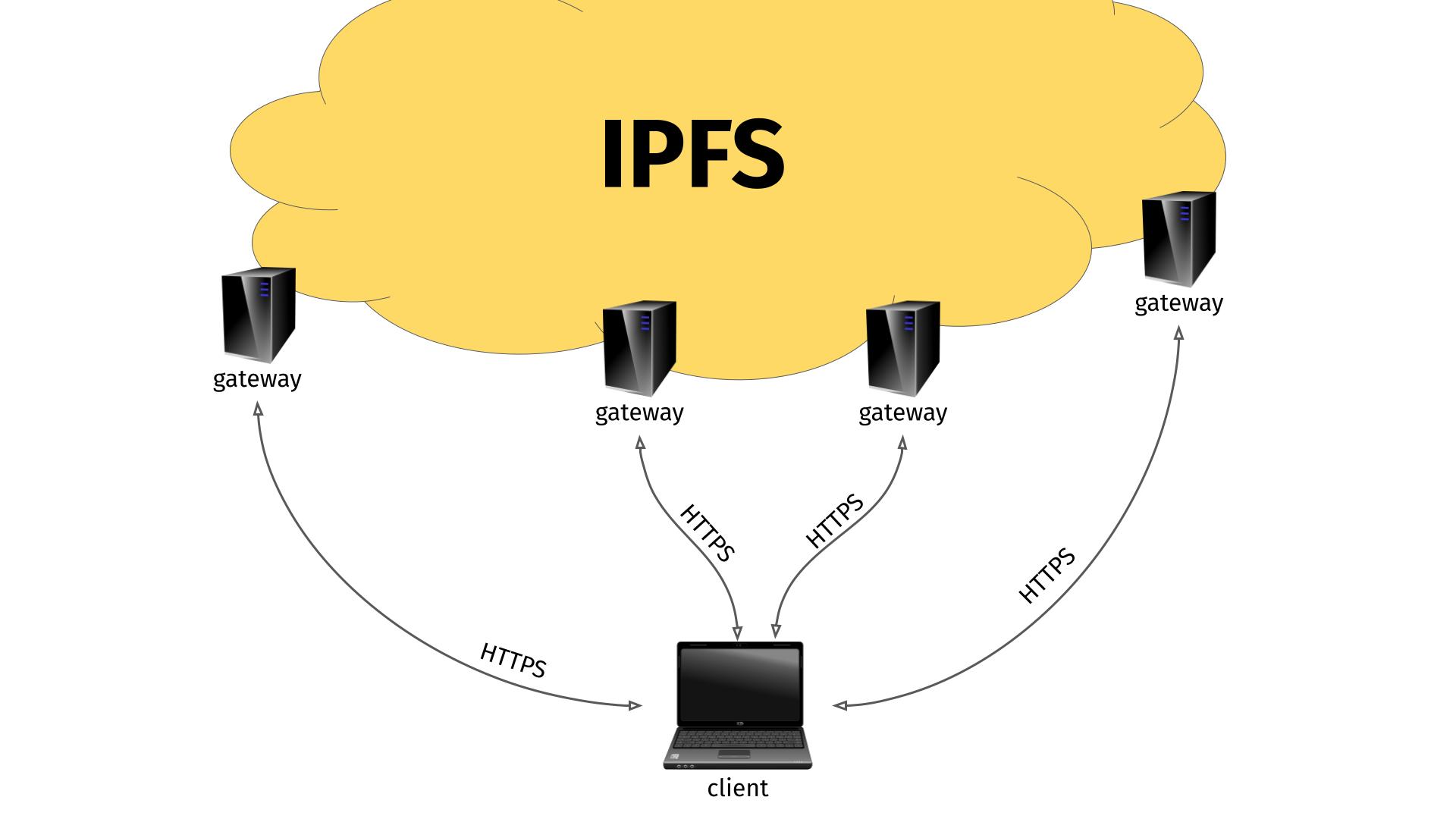
This approach has its biggest benefit of course when you can actually use a remote IPFS gateway. I presume most random ordinary users who want to access IPFS does not actually want to download, install and run an IPFS gateway on their machine to use this new power. They might very well appreciate the idea and convenience of accessing a remote IPFS gateway.

Remote IPFS gateways illustration

After all, the gateways are using HTTPS so at least the transfers are secure, right?

Leading people behind IPFS are even running public IPFS gateways for anyone to use. Both dweb.link and ipfs.io have been mentioned and suggested for default use. Possibly they are the same physical host as they appear to have the same IP addresses (owned by Protocol Labs, one of the big proponents behind IPFS).

The IPFS project also provides a list of public gateways.

No gateway set, use a default!

In an attempt to make this even easier for users, ffmpeg is made to use a built-in default gateway if none is set by the user.

I would expect very few users to actually have an IPFS gateway set. And even fewer to actually specify a local one.

So, when users want to watch a video using ffmpeg and an ipfs:// URL what happens?

The gateway sees it all

The remote gateway, that is administered by someone, somewhere, gets to see the full incoming request, and all traffic (video, whatever) that is sent back to the client (ffmpeg in this example) goes via the gateway. Sure, the client accesses the gateway via HTTPS so nobody can tamper with the traffic along the way, but the gateway is in full control and can inspect and tamper with the data as much as it likes. And there is no way for the client to know or detect if it is happening.

I am not involved in ffmpeg, nor do I have any insights into how the discussions evolved and were done around this subject, but for curl I have put my foot down and said that we must not blindly use and trust any default remote gateway like this. I believe it is our responsibility to not lure users into this traffic-monitoring setup.

Make sure you trust the gateway you use.

The curl way

curl will probably output an error message if there was no gateway set when an ipfs:// URL is used, and inform the user that it needs a gateway set to function and probably also show a URL for a page that contains more information about what this means and how to specify a gateway.

Bouncing gateways!

During the work of making the IPFS support for curl (which I review and comment on, not written or authored myself) I have also learned that some of the IPFS gateways even do regular HTTP 30x redirects to bounce over the client to another gateway.

Meaning: not only do you use and rely a total rando’s gateway on the Internet for your traffic. That gateway might even, on its own discretion, redirect you over to another host. Possibly run somewhere else, monitored by a separate team.

I have insisted, in the PR for ipfs support to curl, that the IPFS URL handling code should not automatically follow such gateway redirects, as I believe that adds even more risk to the user so if a user wants to allow this operation, it should be opt-in.

Imagine rising use of this

I would imagine that the ones hosting a popular default gateway either becomes overloaded and slow, or they need to scale up. If they scale up, they risk to leak traffic even wider. Scaling up also makes the operation more expensive, leading to incentives to make money somehow to finance it. Will the cookie car in the form of a massive data trove perhaps then be used/sold?

Users of these gateways get no promises, no rights, no contracts.

Other IPFS privacy concerns

Brave, the browser, has actual native IPFS support (not using any gateway) and they have an informative page called How does IPFS Impact my Privacy?

Final verdict

I am not dissing the idea nor implementation of IPFS itself. I think using HTTP gateways to access IPFS is a good idea in general as it makes the network more accessible. It is just a fragile solution that easily misleads users to do things they maybe shouldn’t. So maybe a little too accessible?

Credits

Image by Hans Schwarzkopf from Pixaba

Follow-up

I poked the ffmpeg project over Twitter, there was immediate reaction and there is already a proposed patch for ffmpeg that removes the use of a default IPFS gateway. “it’s a security risk”

.netrc pains

The .netrc file is used to hold user names and passwords for specific host names and allows tools to login to those systems automatically without having to prompt the user for the credentials while avoiding having to use them in command lines. The .netrc file is typically set without group or world read permissions (0600) to reduce the risk of leaking those secrets.

History

Allegedly, the .netrc file format was invented and first used for Berknet in 1978 and it has been used continuously since by various tools and libraries. Incidentally, this was the same year Intel introduced the 8086 and DNS didn’t exist yet.

.netrc has been supported by curl (since the summer of 1998), wget, fetchmail, and a busload of other tools and networking libraries for decades. In many cases it is the only cross-tool way to provide credentials to remote systems.

The .netrc file use is perhaps most widely known from the “standard” ftp command line client. I remember learning to use this file when I wanted to do automatic transfers without any user interaction using the ftp command line tool on unix systems in the early 1990s.

Example

A .netrc file where we tell the tool to use the user name daniel and password 123456 for the host user.example.com is as simple as this:

machine user.example.com
login daniel
password 123456

Those different instructions can also be written on the same single line, they don’t need to be separated by newlines like above.

Specification

There is no and has never been any standard or specification for the file format. If you google .netrc now, the best you get is a few different takes on man pages describing the format in a high level. In general this covers our needs and for most simple use cases this is good enough, but as always the devil is in the details.

The lack of detailed descriptions on how long lines or fields to accept, how to handle special character or white space for example have left the implementers of the different code basis to decide by themselves how to handle those things.

The horse left the barn

Since numerous different implementations have been done and have been running in systems for several decades already, it might be too late to do a spec now.

This is also why you will find man pages out there with conflicting information about the support for space in passwords for example. Some of them explicitly say that the file format does not support space in passwords.

Passwords

Most fields in the .netrc work fine even when not supporting special characters or white space, but in this age we have hopefully learned that we need long and complicated passwords and thus having “special characters” in there is now probably more common than back in the 1970s.

Writing a .netrc file with for example a double-quote or a white space in the password unfortunately breaks tools and is not portable.

I have found at least three different ways existing tools do the parsing, and they are all incompatible with each other.

curl parser (before 7.84.0)

curl did not support spaces in passwords, period. The parser split all fields at the following space or newline and accepted whatever is in between. curl thus supported any characters you want, except space and newlines . It also did not “unquote” anything so if you wanted to provide a password like ""llo (with two leading double-quotes), you would use those five bytes verbatim in the file.

wget parser

This parser allows a space in the password if you provide it quoted within double-quotes and use a backslash in front of the space. To specify the same ""llo password mentioned above, you would have to write it as "\"\"llo".

fetchmail parser

Also supports spaces in passwords. Here the double-quote is a quote character itself so in order to provide a verbatim double-quote, it needs to be doubled. To specify the same ""llo password mentioned above, you would have to write it as """"llo – that is with four double-quotes.

What is the best way?

Changing any of these parsers in an effort to unify risk breaking existing use cases and scripts out in the wild with outraged users as a result. But a change could also generate a few happy users too who then could better share the same .netrc file between tools.

In my personal view, the wget parser approach seems to be the most user friendly one that works perhaps most closely to what I as a user would expect. So that’s how I went ahead and made curl work.

What to do

Users will of course be stuck with ancient versions for a long time and this incompatibility situation will remain for the foreseeable future. I can think of a few work-arounds users can do to cope:

  • Avoid space, tabs, newline and various quotes in passwords
  • Use separate .netrc files for separate tools
  • Provide passwords using other means than .netrc – with curl you can for example explore using –config instead

Future curl supports quoting

We are changing the curl parser somewhat in the name of compatibility with other tools (read wget) and curl will allow quoted strings in the way wget does it, starting in curl 7.84.0. While this change risks breaking a few command lines out there (for users who have leading double-quotes in their existing passwords), I think the change is worth doing in the name of compatibility and the new ability to use spaces in passwords.

A little polish after twenty-four years of not supporting spaces in user names or passwords.

Hopefully this will not hurt too many users.

Credits

Image by Anja-#pray for ukraine# #helping hands# stop the war from Pixabay

now on HTTP/3

The first mention of QUIC on this blog was back when I posted about the HTTP workshop of July 2015. Today, this blog is readable over the protocol QUIC subsequently would turn into. (Strictly speaking, it turned into QUIC + HTTP/3 but let’s not be too literal now.)

The other day Fastly announced that all their customers now can enable HTTP/3, and since this blog and the curl site are graciously running on the Fastly network I went ahead and enabled the protocol.

Within minutes and with almost no mistakes, I could load content over HTTP/3 using curl or browsers. Wooosh.

The name HTTP/3 wasn’t adopted until late 2018, and the RFC has still not been published yet. Some of the specifications for QUIC have however.

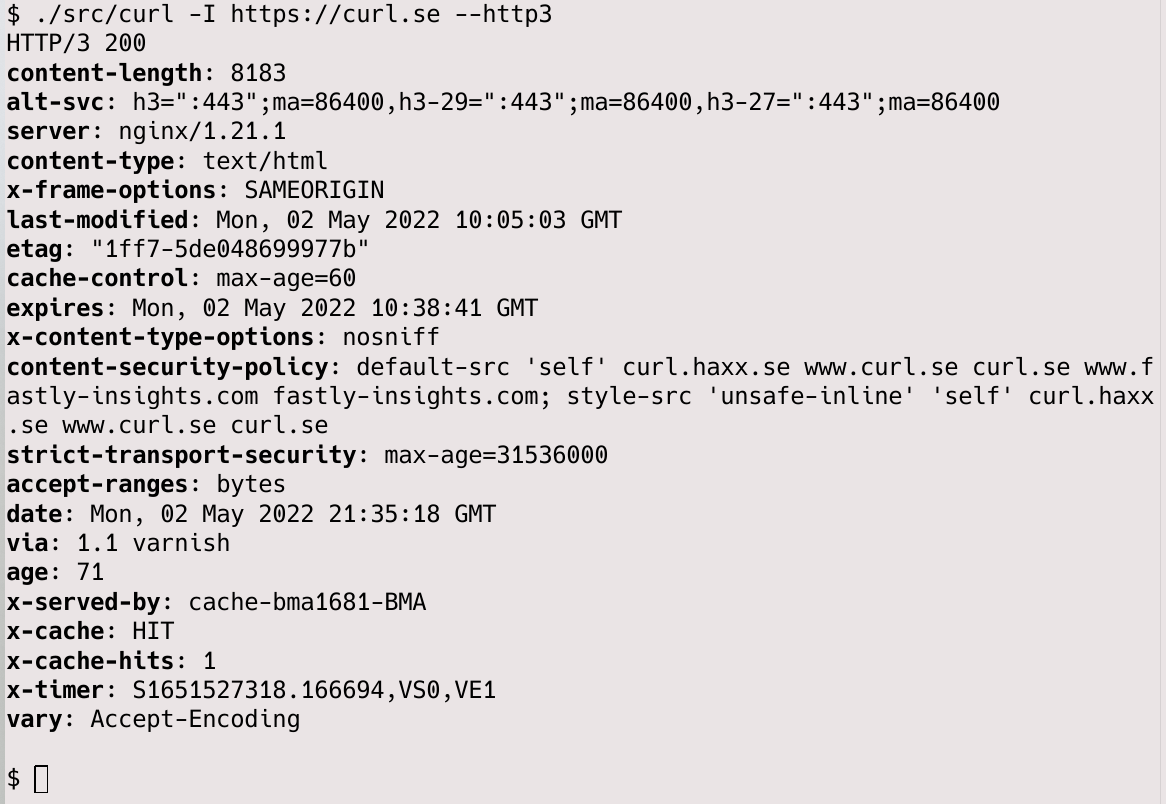
curling curl with h3

Considered “18+”

Vodafone UK has taken it on themselves to make the world better by marking this website (daniel.haxx.se) “adult content”. I suppose in order to protect the children.

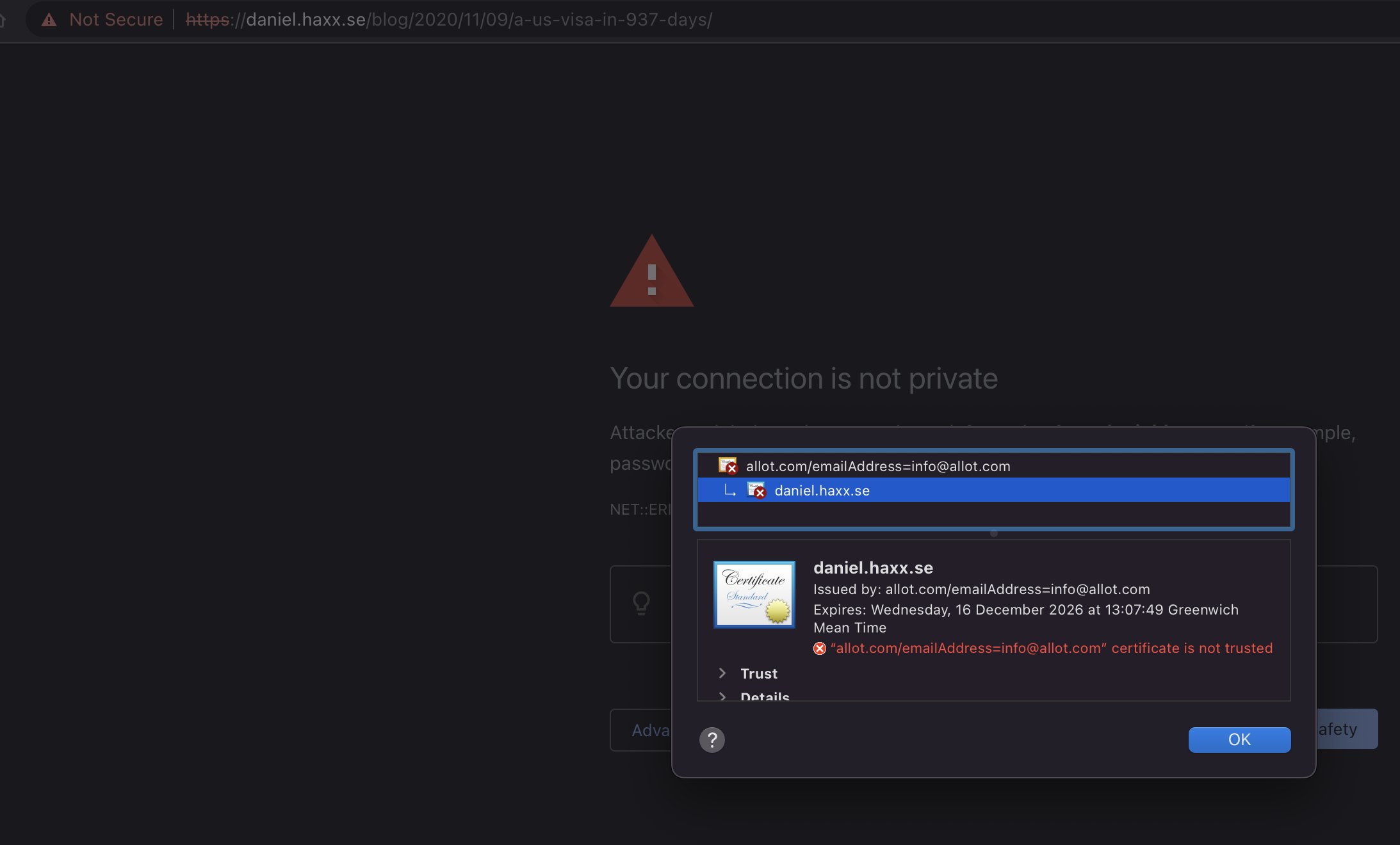
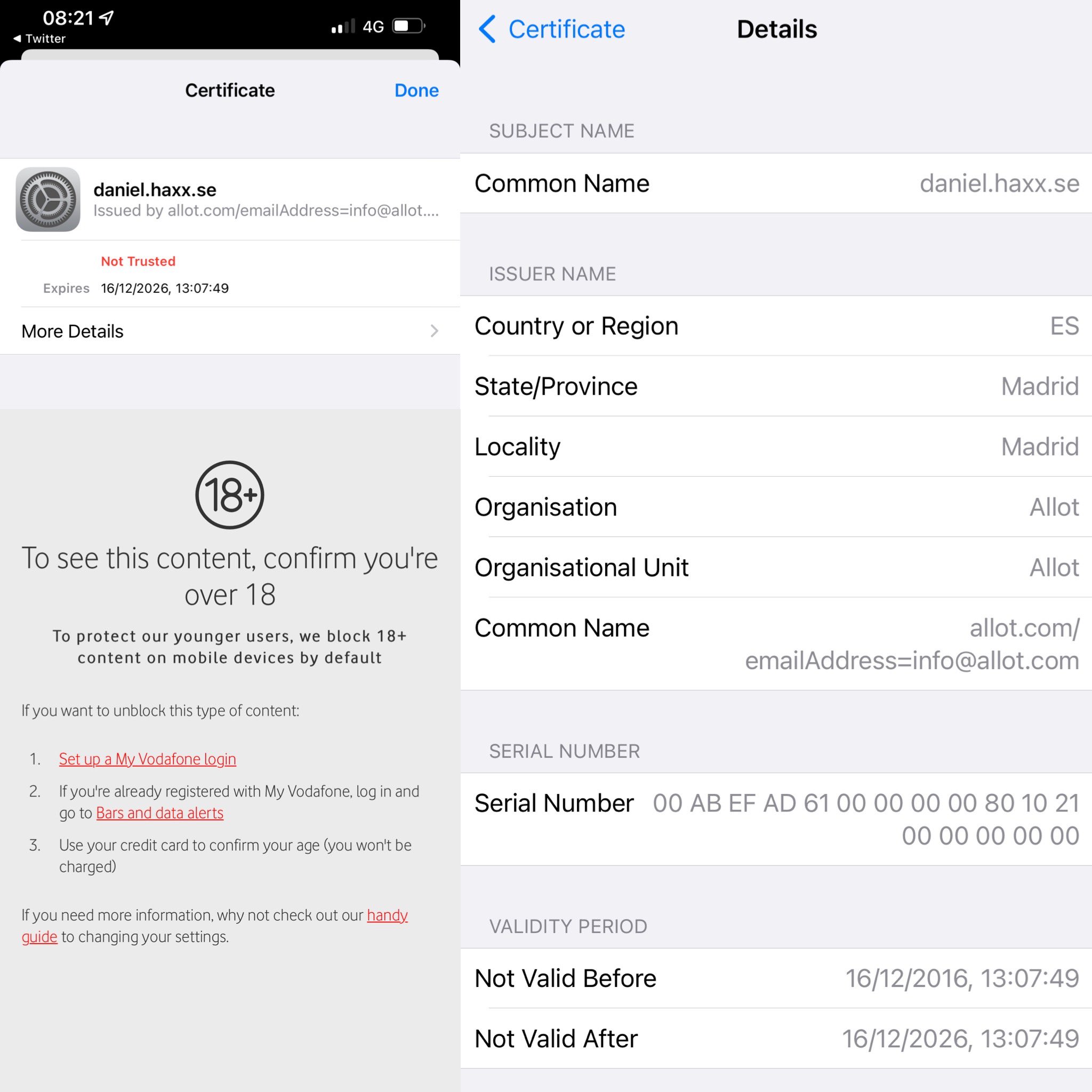
It was first reported to me on May 2, with this screenshot from a Vodafone customer:

And later followed up with some more details from another user in this screenshot

Customers can opt out of this “protection” and then apparently Vodafone will no longer block my site.

How

I was graciously given more logs (my copy) showing DNS resolves and curl command line invokes.

It shows that this filter is for this specific host name only, not for the entire haxx.se domain.

It also shows that the DNS resolves are unaffected as they returned the expected Fastly IP addresses just fine. I suspect they have equipment that inspects outgoing traffic that catches this TLS connection based on the SNI field.

As the log shows, they then make their server do a TLS handshake in which they respond with a certificate that has daniel.haxx.se in the CN field.

The curl verbose output shows this:

* SSL connection using TLSv1.2 / ECDHE-ECDSA-CHACHA20-POLY1305
* ALPN, server did not agree to a protocol
* Server certificate:
*  subject: CN=daniel.haxx.se
*  start date: Dec 16 13:07:49 2016 GMT
*  expire date: Dec 16 13:07:49 2026 GMT
*  issuer: C=ES; ST=Madrid; L=Madrid; O=Allot; OU=Allot; CN=allot.com/emailAddress=info@allot.com
*  SSL certificate verify result: self signed certificate in certificate chain (19), continuing anyway.
> HEAD / HTTP/1.1
> Host: daniel.haxx.se
> User-Agent: curl/7.79.1
> Accept: */*
> 

The allot.com clue is the technology they use for this filtering. To quote their website, you can “protect citizens” with it.

I am not unique, clearly this has also hit other website owners. I have no idea if there is any way to appeal against this classification or something, but if you are a Vodafone UK customer, I would be happy if you did and maybe linked me to a public issue about it.

Update

I was pointed to the page where you can request to unblock specific sites so I have done that now (at 12:00 May 2).

Update on May 3

My unblock request for daniel.haxx.se is apparently “on hold” according to the web site.

I got an email from an anonymous (self-proclaimed) insider who says he works at Allot, the company doing this filtering for Vodafone. In this email, he says

Most likely, Vodafone is using their parental control a threat protection module which works based on a DNS resolving.

and then

After the business logic decides to block the website, it tells the DNS server to reply with a custom IP to a server that always shows a block page, because how HTTPS works, there is no way to trick it, either with Self-signed certificate, or using a signed certificate for a different domain, hence the warning.

What is weird here is that this explanation does not quite match what I have seen the logs provided to me. They showed this filtering clearly not being DNS based – since the DNS resolves got the exact same IP address a non-filtered resolver does.

Someone on Vodafone UK could of course easily test this by simply using a different DNS server, like 1.1.1.1 or 8.8.8.8.

Discussed on hacker news.

Update May 3, 2024: unblocked

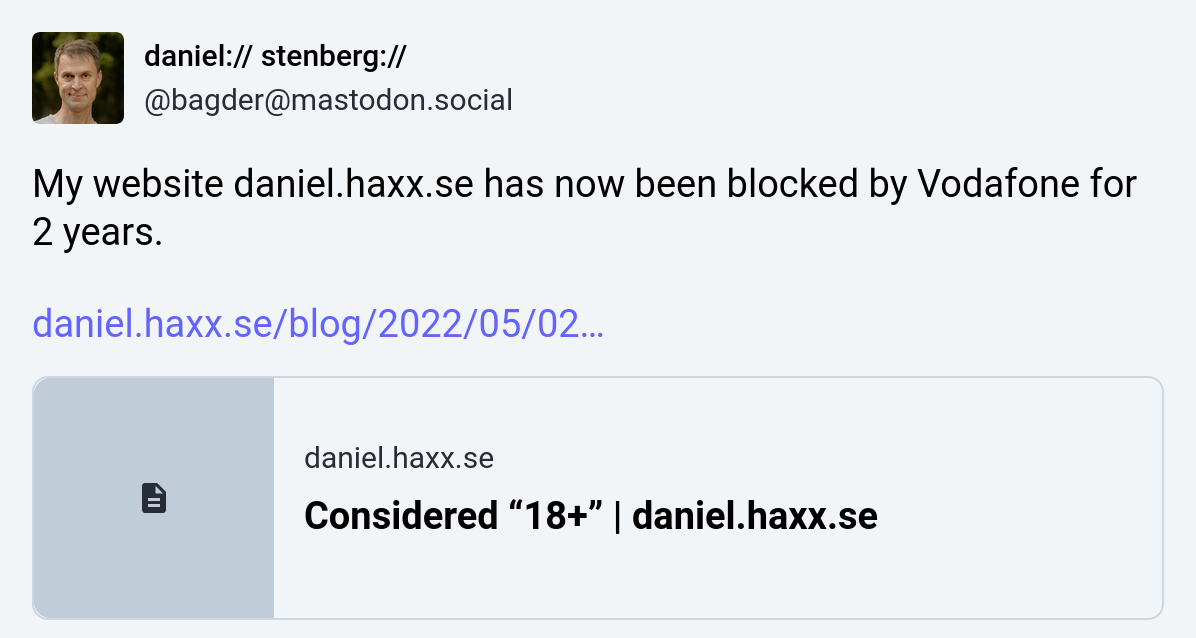
Two years later the situation was the same and I wrote about it on Mastodon:

Just hours later I was emailed by a person who explained they are employed by Vodafone and they forwarded my post internally. The blocking should thereby be gone. The original block was wrongly applied and then my unblocking request from two years ago “never reached the responsible team”.

Another win for complaining in the public.

The QUIC API OpenSSL will not provide

In a world that is now gradually adopting HTTP/3 (which, as you know, is implemented over QUIC), the problem with the missing API for QUIC is still a key problem.

There are a number of existing QUIC library implementation now since a few years back, and they are slowly maturing. The QUIC protocol became RFC 9000 and friends, but the most popular TLS libraries still don’t provide the necessary APIs to make QUIC libraries possible to use them.

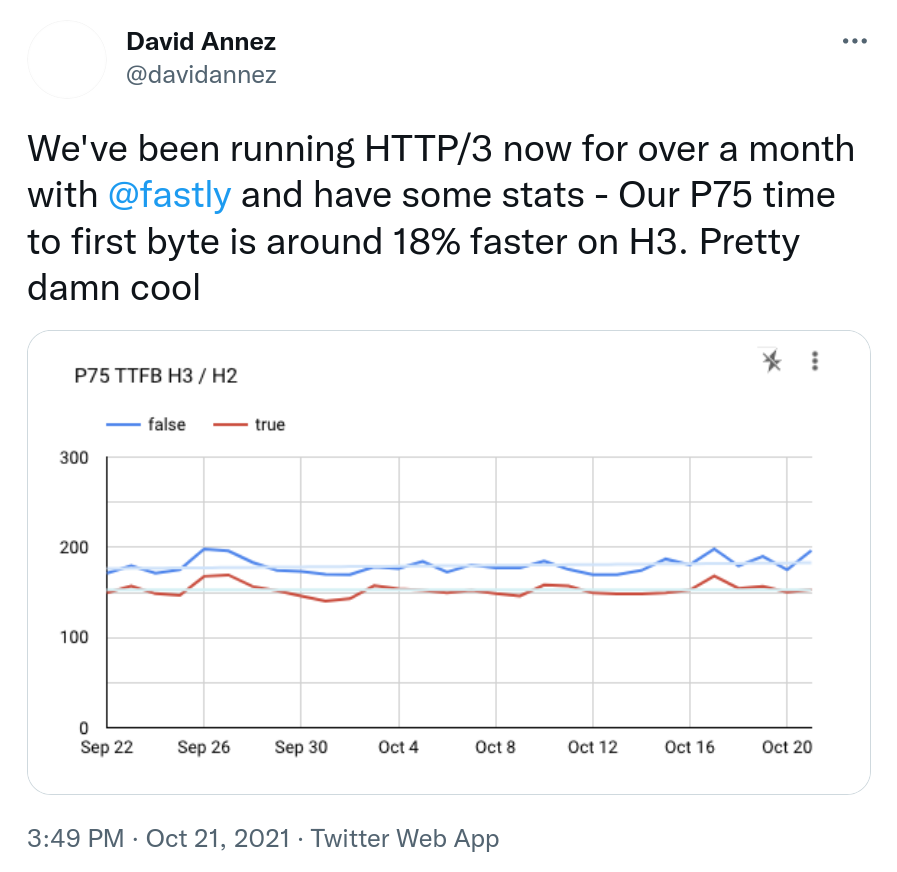
Example that makes people want HTTP/3

Example tweet of what makes people keen on experimenting and deploying HTTP/3.

OpenSSL PR8797

For a long time, many people and projects (including yours truly) in the QUIC community were eagerly following the OpenSSL Pull Request 8797, which introduced the necessary QUIC APIs into OpenSSL. This change brought the same API to OpenSSL that BoringSSL already provides and as such the API has already been used and tested out by several independent implementations.

Implementations have a problem to ship to the world based on BoringSSL since that’s a TLS library without versions and proper releases, so it is not a good choice for the big wide world. OpenSSL is already the most widely used TLS library out there and lots of applications are already made to use that.

Delays made quictls happen

The OpenSSL PR8797 was delayed back in February 2020 on when the OpenSSL management committee (OMC) decreed that they would not deal with that PR until after their pending 3.0.0 release had shipped.

“It is our expectation that once the 3.0 release is done, QUIC will become a significant focus of our effort.”

OpenSSL then proceeded and their 3.0.0 release was delayed significantly compared to their initial time schedule.

In March 2021, Microsoft and Akamai announced quictls, an OpenSSL fork with the express idea to ship OpenSSL + the QUIC API. They didn’t want to wait for OpenSSL to do it.

Several QUIC libraries can now use quictls. quictls has kept their fork up to date and now offers the equivalent of OpenSSL 3.0.0 + the QUIC API.

While we’ve been waiting for OpenSSL to adopt the API.

OpenSSL makes a turn instead

Then came the next blow to everyone’s expectations. An autumn surprise. On October 13, the OpenSSL OMC announces:

The focus for the next releases is QUIC, with the objective of providing a fully functional QUIC implementation over a series of releases (2-3).

OpenSSL has decided to implement a complete QUIC stack on their own and with the given time line it sounds like it will take them a few years (?) to ship. And instead of providing the API lots of implementers have been been waiting for so long, they explicitly say that it is a non-goal at the start:

The MVP will not contain a library API for an HTTP/3 implementation (it is a non-goal of the initial release).

I didn’t write my own QUIC implementation but I’ve followed the work of several of the implementations fairly closely and it is fairly complicated journey they set out for themselves – for very unclear reasons. There already exist several high quality QUIC libraries, why does OpenSSL think they need to make yet another one? They seem to be overloaded with work already before, which the long delays of the 3.0.0 release seemed to show, how are they going to be able to add a complete new stack implementation of top of this? The future will tell.

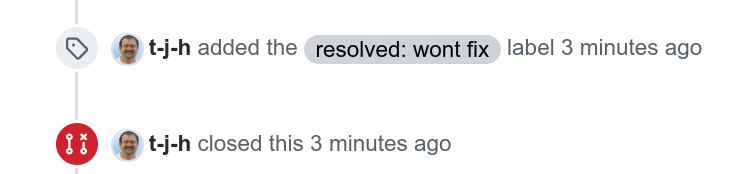
PR8797 closed

On October 20 2021, the pull request that was created in April 2019, is finally closed for real as a “won’t fix”.

Screenshot of the actual closing of the PR

Where are we now?

The lack of a QUIC API in OpenSSL has held us back and with this move from OpenSSL, it will continue to hold us back for an uncertain amount of time going forward.

QUIC stacks will have to stick to using or switching to other libraries.

I’m disappointed.

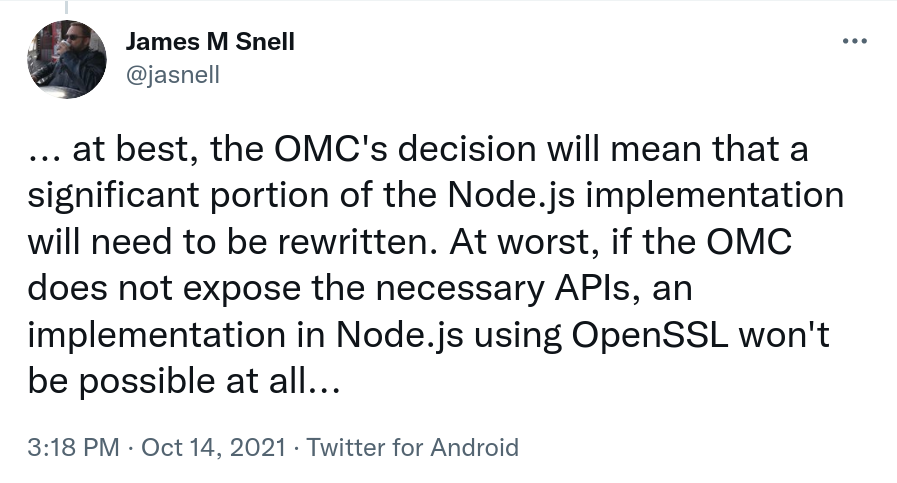
James Snell, one of the key contributors on the QUIC and HTTP/3 work in nodejs tweeted:

Credits

Image by Marzena P. from Pixabay

curl localhost as a local host

When you use the name localhost in a URL, what does it mean? Where does the network traffic go when you ask curl to download http://localhost ?

Is “localhost” just a name like any other or do you think it infers speaking to your local host on a loopback address?

Previously

curl http://localhost

The name was “resolved” using the standard resolver mechanism into one or more IP addresses and then curl connected to the first one that works and gets the data from there.

The (default) resolving phase there involves asking the getaddrinfo() function about the name. In many systems, it will return the IP address(es) specified in /etc/hosts for the name. In some systems things are a bit more unusually setup and causes a DNS query get sent out over the network to answer the question.

In other words: localhost was not really special and using this name in a URL worked just like any other name in curl. In most cases in most systems it would resolve to 127.0.0.1 and ::1 just fine, but in some cases it would mean something completely different. Often as a complete surprise to the user…

Starting now

curl http://localhost

Starting in commit 1a0ebf6632f8, to be released in curl 7.78.0, curl now treats the host name “localhost” specially and will use an internal “hard-coded” set of addresses for it – the ones we typically use for the loopback device: 127.0.0.1 and ::1. It cannot be modified by /etc/hosts and it cannot be accidentally or deliberately tricked by DNS resolves. localhost will now always resolve to a local address!

Does that kind of mistakes or modifications really happen? Yes they do. We’ve seen it and you can find other projects report it as well.

Who knows, it might even be a few microseconds faster than doing the “full” resolve call.

(You can still build curl without IPv6 support at will and on systems without support, for which the ::1 address of course will not be provided for localhost.)

Specs say we can

The RFC 6761 is titled Special-Use Domain Names and in its section 6.3 it especially allows or even encourages this:

Users are free to use localhost names as they would any other domain names.  Users may assume that IPv4 and IPv6 address queries for localhost names will always resolve to the respective IP loopback address.

Followed by

Name resolution APIs and libraries SHOULD recognize localhost names as special and SHOULD always return the IP loopback address for address queries and negative responses for all other query types. Name resolution APIs SHOULD NOT send queries for localhost names to their configured caching DNS server(s).

Mike West at Google also once filed an I-D with even stronger wording suggesting we should always let localhost be local. That wasn’t ever turned into an RFC though but shows a mindset.

(Some) Browsers do it

Chrome has been special-casing localhost this way since 2017, as can be seen in this commit and I think we can safely assume that the other browsers built on their foundation also do this.

Firefox landed their corresponding change during the fall of 2020, as recorded in this bugzilla entry.

Safari (on macOS at least) does however not do this. It rather follows what /etc/hosts says (and presumably DNS of not present in there). I’ve not found any official position on the matter, but I found this source code comment indicating that localhost resolving might change at some point:

// FIXME: Ensure that localhost resolves to the loopback address.

Windows (kind of) does it

Since some time back, Windows already resolves “localhost” internally and it is not present in their /etc/hosts alternative. I believe it is more of a hybrid solution though as I believe you can put localhost into that file and then have that custom address get used for the name.

Secure over http://localhost

When we know for sure that http://localhost is indeed a secure context (that’s a browser term I’m borrowing, sorry), we can follow the example of the browsers and for example curl should be able to start considering cookies with the “secure” property to be dealt with over this host even when done over plain HTTP. Previously, secure in that regard has always just meant HTTPS.

This change in cookie handling has not happened in curl yet, but with localhost being truly local, it seems like an improvement we can proceed with.

Can you still trick curl?

When I mentioned this change proposal on twitter two of the most common questions in response were

  1. can’t you still trick curl by routing 127.0.0.1 somewhere else
  2. can you still use --resolve to “move” localhost?

The answers to both questions are yes.

You can of course commit the most hideous hacks to your system and reroute traffic to 127.0.0.1 somewhere else if you really wanted to. But I’ve never seen or heard of anyone doing it, and it certainly will not be done by mistake. But then you can also just rebuild your curl/libcurl and insert another address than the default as “hardcoded” and it’ll behave even weirder. It’s all just software, we can make it do anything.

The --resolve option is this magic thing to redirect curl operations from the given host to another custom address. It also works for localhost, since curl will check the cache before the internal resolve and --resolve populates the DNS cache with the given entries. (Provided to applications via the CURLOPT_RESOLVE option.)

What will break?

With enough number of users, every single little modification or even improvement is likely to trigger something unexpected and undesired on at least one system somewhere. I don’t think this change is an exception. I fully expect this to cause someone to shake their fist in the sky.

However, I believe there are fairly good ways to make to restore even the most complicated use cases even after this change, even if it might take some hands on to update the script or application. I still believe this change is a general improvement for the vast majority of use cases and users. That’s also why I haven’t provided any knob or option to toggle off this behavior.

Credits

The top photo was taken by me (the symbolism being that there’s a path to take somewhere but we don’t really know where it leads or which one is the right to take…). This curl change was written by me. Mike West provided me the Chrome localhost change URL. Valentin Gosu gave me the Firefox bugzilla link.

QUIC is RFC 9000

The official publication date of the relevant QUIC specifications is: May 27, 2021.

I’ve done many presentations about HTTP and related technologies over the years. HTTP/2 had only just shipped when the QUIC working group had been formed in the IETF and I started to mention and describe what was being done there.

I’ve explained HTTP/3

I started writing the document HTTP/3 explained in February 2018 before the protocol was even called HTTP/3 (and yeah the document itself was also called something else at first). The HTTP protocol for QUIC was just called “HTTP over QUIC” in the beginning and it took until November 2018 before it got the name HTTP/3. I did my first presentation using HTTP/3 in the title and on slides in early December 2018, My first recorded HTTP/3 presentation was in January 2019 (in Stockholm, Sweden).

In that talk I mentioned that the protocol would be “live” by the summer of 2019, which was an optimistic estimate based on the then current milestones set out by the IETF working group.

I think my optimism regarding the release schedule has kept up but as time progressed I’ve updated that estimation many times…

HTTP/3 – not yet

The first four RFC documentations to be ratified and published only concern QUIC, the transport protocol, and not the HTTP/3 parts. The two HTTP/3 documents are also in queue but are slightly delayed as they await some other prerequisite (“generic” HTTP update) documents to ship first, then the HTTP/3 ones can ship and refer to those other documents.

QUIC

QUIC is a new transport protocol. It is done over UDP and can be described as being something of a TCP + TLS replacement, merged into a single protocol.

Okay, the title of this blog is misleading. QUIC is actually documented in four different RFCs:

RFC 8999 – Version-Independent Properties of QUIC

RFC 9000 – QUIC: A UDP-Based Multiplexed and Secure Transport

RFC 9001 – Using TLS to Secure QUIC

RFC 9002 – QUIC Loss Detection and Congestion Control

My role: I’m just a bystander

I initially wanted to keep up closely with the working group and follow what happened and participate on the meetings and interims etc. It turned out to be too difficult for me to do that so I had to lower my ambitions and I’ve mostly had a casual observing role. I just couldn’t muster the energy and spend the time necessary to do it properly.

I’ve participated in many of the meetings, I’ve been present in the QUIC implementers slack, I’ve followed lots of design and architectural discussions on the mailing list and in GitHub issues. I’ve worked on implementing support for QUIC and h3 in curl and thanks to that helped out iron issues and glitches in various implementations, but the now published RFCs have virtually no traces of me or my feedback in them.